Another part of the conkyatlogin script is displaying top processes and top memory usage. You should have probably read my previous article on building an rpm with nvidia and images support and the article about loading conky at GNOME startup.
Create the script which is called from the conkyatlogin launcher.
touch ~/bin/conky/filesystem.conky
chmod a+x ~/bin/conky/filesystem.conky
gedit ~/bin/conky/filesystem.conky
Copy and paste (pay attention to ${if_mounted /media/some_drive} blocks, change to your values):

use_xft yes override_utf8_locale yes xftfont DejaVu Sans Mono:size=7 xftalpha 0.1
background yes double_buffer yes own_window yes own_window_class Conky own_window_argb_visual yes #own_window_argb_value 255 own_window_transparent yes #own_window_colour black own_window_type normal own_window_hints undecorated,below,sticky,skip_taskbar,skip_pager
top_cpu_separate no cpu_avg_samples 2 net_avg_samples 2 update_interval 2.0 update_interval_on_battery 2.0
draw_borders no border_width 0 border_inner_margin 12 border_outer_margin 0 #pad_percents 20 #stippled_borders 0
draw_graph_borders yes draw_outline no draw_shades no #default_bar_size 8 16 default_color #FFFFFF default_gauge_size 30 30 default_graph_size 0 30 #default_outline_color white #default_shade_color #888888 #extra_newline no format_human_readable yes short_units no #no_buffers yes #show_graph_scale no #show_graph_range no #out_to_console no #out_to_stderr no #use_spacer none #uppercase no
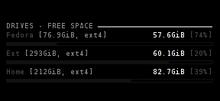
TEXT ${color #888888}DRIVES – FREE SPACE ${hr 2}$color ${color #444444}Fedora ${color #888888}[${fs_size /}, ${fs_type /}] ${color #FFFFFF}$alignr${fs_free /} ${color #444444}[${fs_free_perc /}%] ${color #111111}${fs_bar 4,270 /} ${color #444444}Home ${color #888888}[${fs_size /home}, ${fs_type /home}] ${color #FFFFFF}$alignr${fs_free /home} ${color #444444}[${fs_free_perc /home}%] ${color #111111}${fs_bar 4,270 /home}${if_mounted /media/Kingstone} ${color #444444}USB Stick ${color #888888}[${fs_size /media/Kingstone}, ${fs_type /media/Kingstone}] ${color #FFFFFF}$alignr${fs_free /media/Kingstone} ${color #444444}[${fs_free_perc /media/Kingstone}%] ${color #111111}${fs_bar 4,270 /media/Kingstone}${endif}${if_mounted /media/IPOD} ${color #444444}Ipod ${color #888888}[${fs_size /media/IPOD}, ${fs_type /media/IPOD}] ${color #FFFFFF}$alignr${fs_free /media/IPOD} ${color #444444}[${fs_free_perc /media/IPOD}%] ${color #111111}${fs_bar 4,270 /media/IPOD}${endif}${if_mounted /media/disk} ${color #444444}Removable ${color #888888}[${fs_size /media/disk}, ${fs_type /media/disk}] ${color #FFFFFF}$alignr${fs_free /media/disk} ${color #444444}[${fs_free_perc /media/disk}%] ${color #111111}${fs_bar 4,270 /media/disk}${endif}
The result is below:
This is the last article about my conky configuration.